Making Tax Digital for landlords, made calm
A spreadsheet workbook and a step-by-step guide that turn four quarterly updates a year into a short, tidy job. One-off purchase, no subscription.
Instant download · Excel and Google Sheets · Not affiliated with HMRC
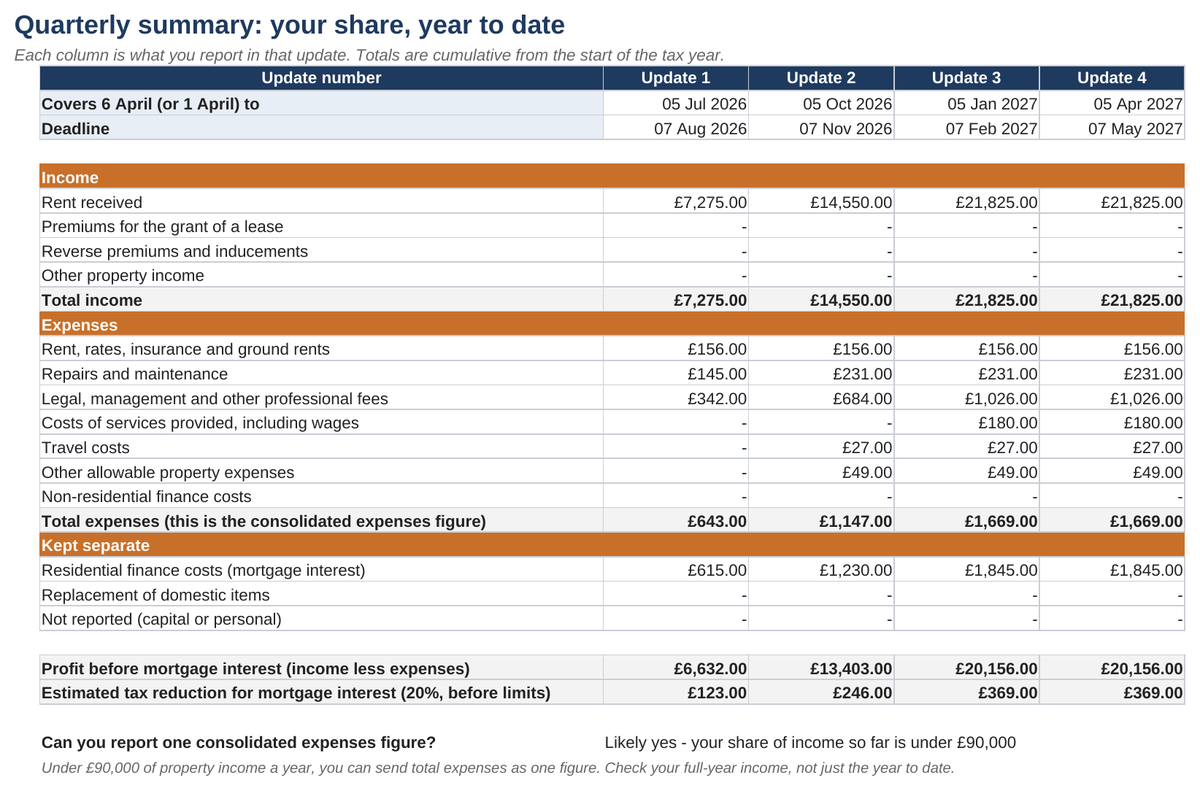
Your figures, done
Log rent and costs as they happen. The workbook totals your share, year to date, in HMRC's own property categories for all four updates.
Joint owners sorted
Own a property with a partner? Set your share once. Every total, and your MTD threshold check, uses only your part.
Ready for bridging software
One fixed block of figures for free bridging software to read, so you never retype numbers or break HMRC's "digital link" rule.
How it works
- Record
Log each payment in or out. Pick the property and the category. - Summarise
Your share, year to date, for each of the four cumulative updates. - Bridge
Your bridging software reads the figures straight from the workbook. - Send
The software sends the update to HMRC. Tick it off on the Deadlines tab.
What the kit is, and isn't
It is
- A record-keeping workbook for UK landlords, laid out in HMRC's property categories
- A plain-English guide to sending updates through bridging software
- Checked against GOV.UK guidance (16 October 2026)
- A one-off purchase
It isn't
- Software that submits to HMRC by itself (you also need bridging software)
- Tax advice, or affiliated with HMRC
- For limited companies
- A full tax calculator
Free help while you get ready
Am I in MTD?
Answer three questions to see whether and when Making Tax Digital applies to you, including joint ownership.
Deadlines for 2026/27
Every quarterly update date, with a calendar file you can add to Outlook or Google Calendar.
MTD for landlords
The plain-English guide: who's in, what goes in each update, mortgage interest, spreadsheets and bridging software.
Common questions
Does the kit send my updates to HMRC?
No. A spreadsheet can't send updates by itself. You also need MTD-compatible bridging software, and some is free. The guide shows what to look for.
Will it work in Google Sheets or on a Mac?
Yes. It's an Excel file that opens in Excel on Windows or Mac, and in Google Sheets.
I own a property jointly. Can I use it?
Yes. Set your ownership share once and every total uses your share.
Is this tax advice?
No. It's a record-keeping aid. For advice on your own situation, speak to a qualified accountant.